Credentials
Credentials are your AAPC and AHIMA coding certifications that show Kode Health and its clients that you're a
qualified professional medical coder.
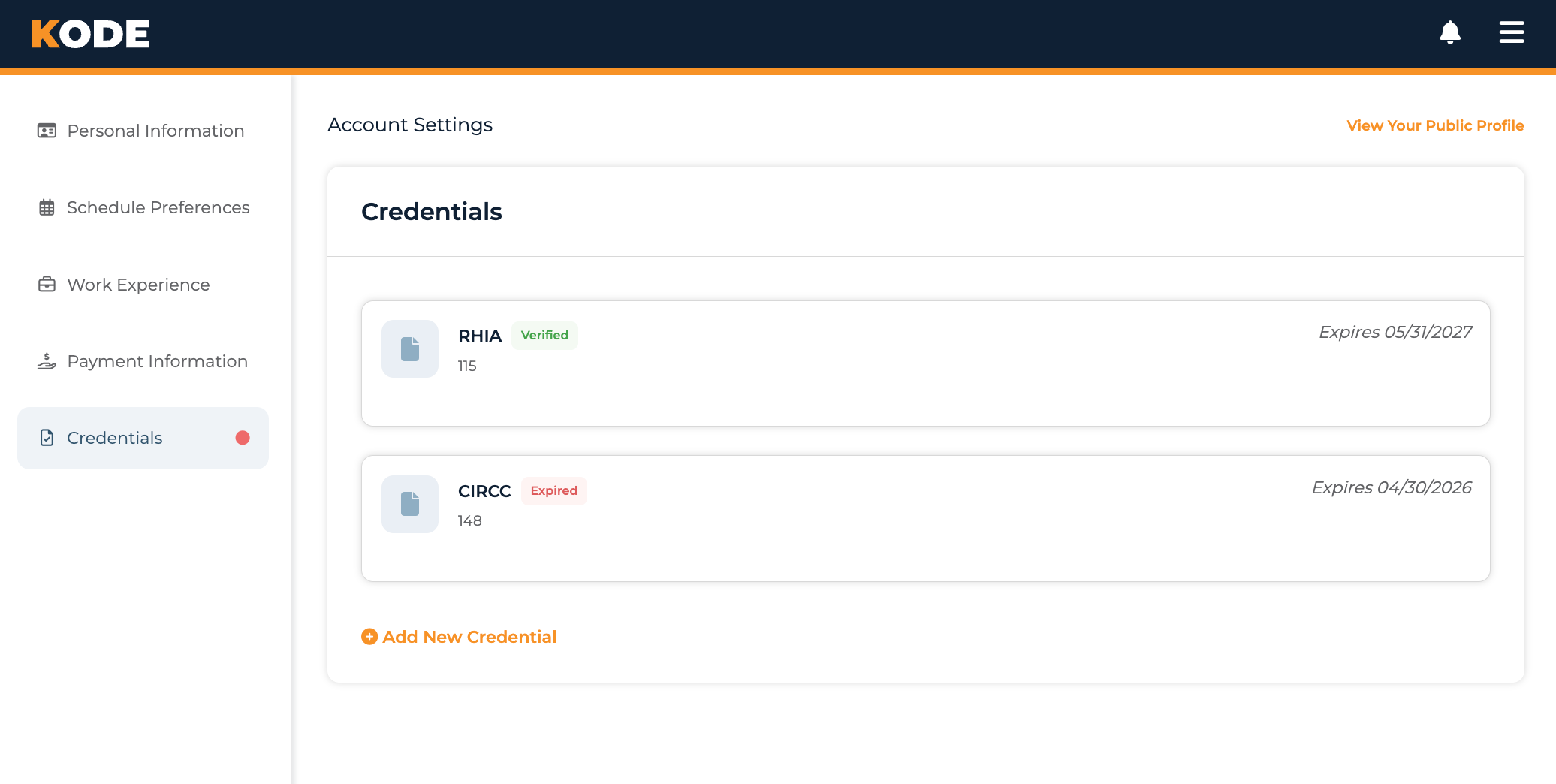
Credentials page with the list of your professional credentials and the Add New Credential action
Why Credentials Matter
Kode Health and its clients only work with professional medical coders — and an active certification is the minimum
baseline proficiency we accept. Some clients may require or exclude specific certifications.
In the Kode platform you are only shown opportunities that accept your verified certifications.
What Certifications Kode Accepts
Kode Health accepts professional coding certifications from the American Health Information Management
Association (AHIMA®) and the American Academy of Professional Coders
(AAPC). Specifically we accept the following certifications:
AHIMA Certifications
- CCS® - Certified Coding Specialist
- CCS-P® - Certified Coding Specialist – Physician-based
- RHIA® - Registered Health Information Administrator
- RHIT® - Registered Health Information Technician
AAPC Core Certifications
- CPC® - Certified Professional Coder
- CPC-P® - Certified Professional Coder – Payer
- COC™ - Certified Outpatient Coder
- CIC™ - Certified Inpatient Coder
- CRC™ - Certified Risk Adjustment Coder
- CPMA® - Certified Professional Medical Auditor
AAPC Specialty Certifications
- CANPC™ - Certified Anesthesia and Pain Management Coder
- CASCC™ - Certified Ambulatory Surgery Center Coder
- CCC™ - Certified Cardiology Coder
- CCPC™ - Certified Chiropractic Professional Coder
- CCVTC™ - Certified Cardiovascular and Thoracic Surgery Coder
- CEDC® - Certified Emergency Department Coder
- CEMC® - Certified Evaluation and Management Coder
- CENTC™ - Certified Otolaryngology Coder
- CFPC™ - Certified Family Practice Coder
- CGIC™ - Certified Gastroenterology Coder
- CGSC™ - Certified General Surgery Coder
- CHONC™ - Certified Hematology and Oncology Coder
- CIMC™ - Certified Internal Medicine Coder
- CIRCC® - Certified Interventional Radiology Cardiovascular Coder
- COBGC™ - Certified Obstetrics and Gynecology Coder
- COPC® - Certified Ophthalmology Coder
- COSC™ - Certified Orthopedic Surgery Coder
- CPCD® - Certified Professional Coder in Dermatology
- CPEDC™ - Certified Pediatrics Coder
- CPRC™ - Certified Plastics and Reconstructive Surgery Coder
- CRHC™ - Certified Rheumatology Coder
- CSFAC™ - Certified Surgical Foot and Ankle Coder
- CUC™ - Certified Urology Coder
Kode Health and its clients do not accept apprentice certifications (e.g. CCA® and CPC-A®), certifications from
other professional organizations (e.g. the National Healthcareer Association), or credentials whose primary focus is not
professional medical coding (e.g. billing, data integrity, practice management)
How To Access Your Profile Credentials
To view, update, or check the review status of your credentials:
- From your Dashboard, click Profile at the bottom of the left sidebar.
- Select the Credentials tab.
You can also go directly to the linked Credentials page.
Adding a Credential
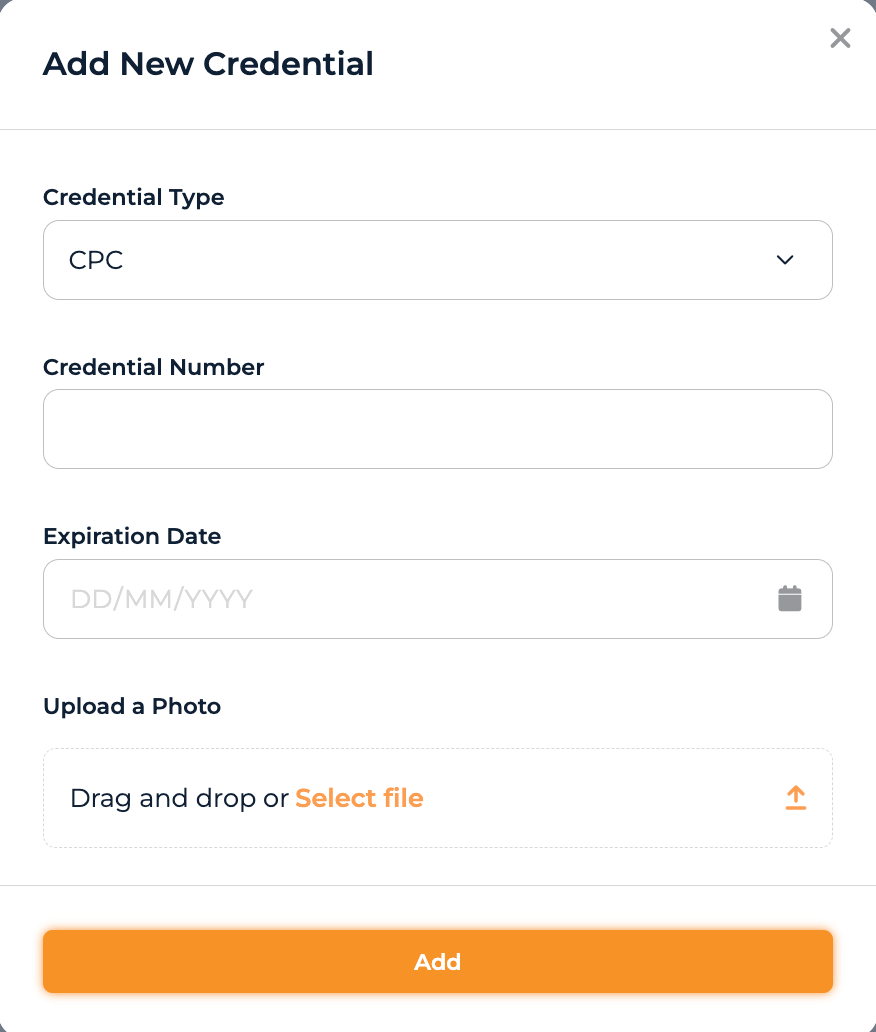
Add New Credential modal with the Credential Type, Number, Expiration Date, and Upload fields
- From the Credentials page, click Add New Credential.
- Select the type of certification from Credential Type.
- Enter your credential number in Credential Number
- For AAPC certifications, this is the same as your membership number.
- For AHIMA certifications, your certification number is not your member number. Please be careful to enter the certification number, not your member number.
- Enter the expiration date of the certification in Expiration Date.
- Under Upload a Photo, upload an image or PDF of the certificate or other document that verifies that you have the certification.
- Click Add to save.
After you add a credential, Kode Health will verify it against the
AAPC Medical Coding Credential Verification Portal
or the
AHIMA Credential Verification Portal.
This process is typically completed within a few hours, but can take up to a few days. If your credential is listed as
"In Review" for more than three business days, please reach out to the Kode Help Desk.
Editing a Credential / Renewing an Expiring Credential
If you entered the details of a certification incorrectly or you need to update an expiring certification, you can edit
the details by clicking the credential on the list, changing the details, and then clicking "Update".
Once updated, your credential will be reverified by Kode.
Common Questions
Q: Which credentials should I add?
Start with any certifications that cover general professional coding (e.g. AHIMA CCS or AAPC CPC). These
certifications are the most accepted by Kode Health and its clients. If you have additional specialty certifications,
adding them will show your deeper knowledge and experience with specific areas of coding.
Q: My credential isn't in the list — what do I do?
Kode does not accept all medical coding certifications. We do not accept apprentice certifications
(e.g. CCA® and CPC-A®), certifications from professional organizations other than AHIMA and the AAPC, or certifications
whose primary focus is not professional coding (e.g. billing, data integrity, practice management).
We regularly review the certifications that we accept, but if you feel we have missed one that should be accepted,
please reach out to the Kode Help Desk.
Q: Why is my credential "Not Valid"?
If your credential is marked as invalid, you will receive an email from our staff telling you why. Typically,
credentials are marked invalid because we could not independently verify them in either the
AAPC Medical Coding Credential Verificaton Portal
or the
AHIMA Credential Verification Portal.
If your credential is marked invalid, please verify that you have entered your credential number correctly, that the
document you uploaded to the Kode platform contains the credential number and your name. If your credential is
under a maiden name or other name, please ensure the document you upload clearly indicates the name the credential
is under.
Q: Can I delete a credential?
No, currently our platform does not allow you to remove a certification. If you have decided to not renew a
certification or have entered the same certification twice and want it removed from your profile, please contact
the Kode Help Desk.
Q: Can I work while a credential is "In Review"?
No, you are not able to apply for opportunities or work if your credential has not been verified or is expired.
Q: What happens if I let my credential expire?
If you let all of your certifications expire you will lose your ability to apply for any new opportunities with Kode
Health and will be removed from teams you are currently on.
Q: What if I have other credentials or state licenses?
Though we do not allow you to upload these as credentials in the Kode platform. You can reference these in the Work
Experience section of your profile. If a client requires
additional credentials or licenses these will be asked for during onboarding.